You’ve just ordered biryani. The app shows your rider moving — live, smooth, every few seconds. A tiny rider gliding through Hyderabad traffic toward you. You don’t think about it. You just watch.
But here’s what’s actually happening: your rider’s phone is screaming its GPS coordinates at a server every 500 milliseconds. Not just your rider. Every rider in the city. All of them, simultaneously, all the time.
Now the engineering question: how does any of that reach you without the whole system collapsing?
This is a story about that question — and the rabbit hole it opens.
The naive solution (and why it breaks)
First instinct: the rider’s app hits an API, the API pushes directly to the customer over a WebSocket. Simple. Direct. Obvious.
Now scale it. 10,000 riders. Each sending a location update every 500ms. That is 20,000 requests per second landing on your WebSocket server — continuously, not in bursts. Not a spike. Just relentless, sustained load.
Your WebSocket server goes down for 30 seconds during a deploy. Those 600,000 location updates? Gone. Vanished. The rider still moved — but your system has no memory of it.
This is where async architecture steps in. And to understand it, you need to understand one thing first.
The one concept that unlocks everything: producer-consumer decoupling
The core idea is deceptively simple. You separate the thing that creates work from the thing that does work.
A message broker sits in the middle. The producer (your API) dumps messages into it. The consumers (your workers) pull from it at their own pace. Neither side needs to know about the other’s health, speed, or availability.
This solves two problems at once:
Rate decoupling — your API produces at rider speed. Your workers consume at whatever speed they can handle. If workers are slow, messages queue up. Nobody drops anything.
Durability — if your WebSocket server dies, messages wait in the queue. When it recovers, it continues from where it left off. Without a queue, those messages are gone forever.
Here is the architecture that actually makes Zomato’s map work:
Rider app -> API Service -> Queue -> Workers -> WebSocket -> Customer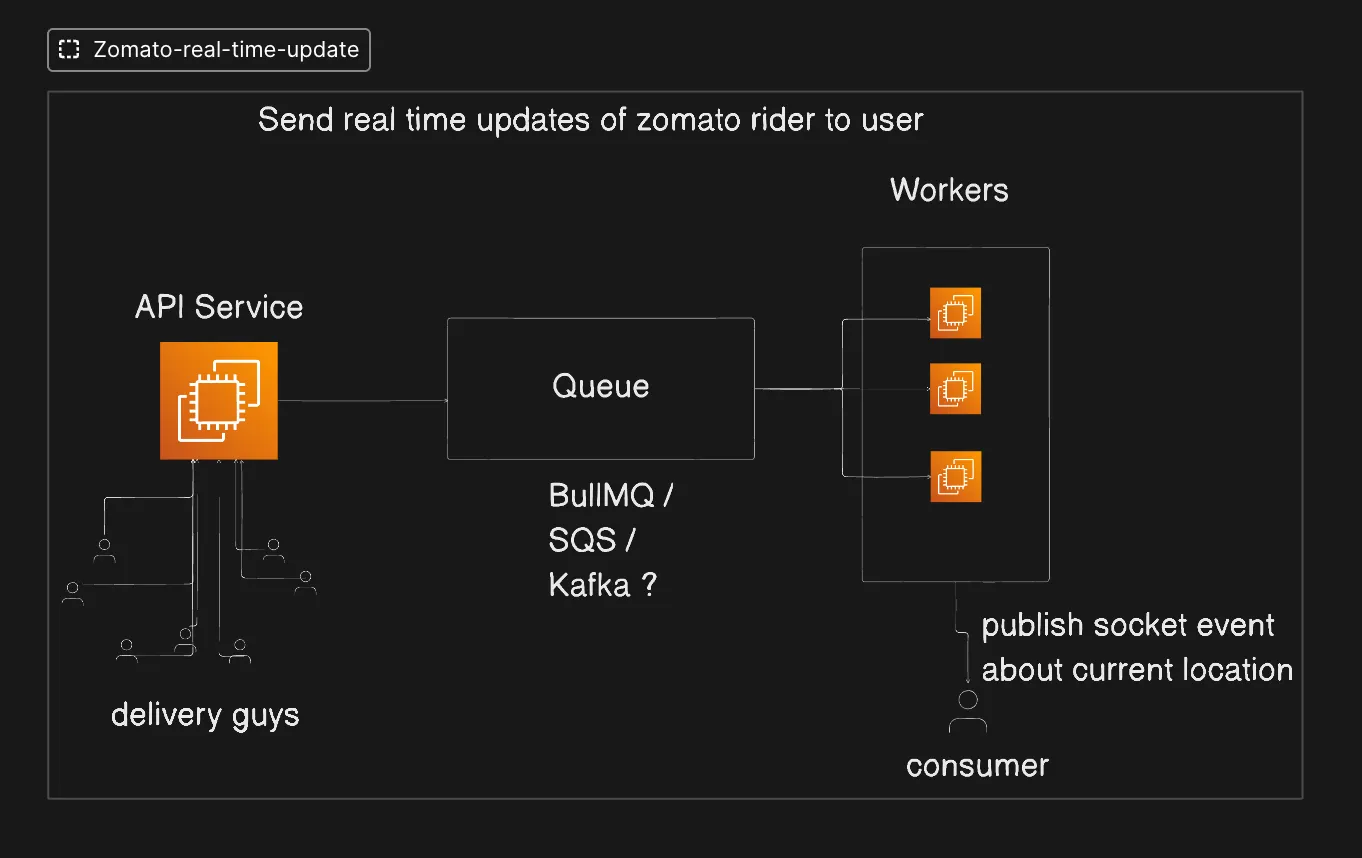
Every arrow is a deliberate decoupling point. Now the interesting question: what kind of queue?
Push-based vs pull-based brokers
RabbitMQ, BullMQ, SQS, Kafka — why do we have so many queues? They all seem to do roughly the same thing, right?
They don’t.
The fundamental split is in who controls the flow.
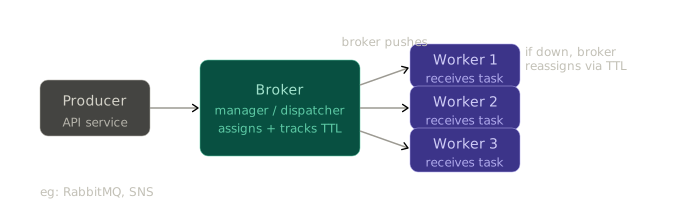
Push-based brokers
In a push-based system, the broker is the manager. It holds the messages, decides which worker gets which message, and actively sends them. Think of it like a dispatcher calling delivery agents — the dispatcher controls the assignment.
If a worker dies, the broker knows. It has a TTL on message assignments. If a worker does not acknowledge within that window, the broker reassigns the message to another worker. It tracks which message went to which worker — you do not have to.
Examples: RabbitMQ, SNS
Pull-based brokers
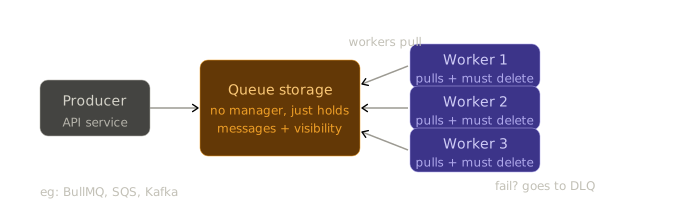
In a pull-based system, there is no dispatcher. Workers reach into the queue themselves and take what they need. The broker just stores messages — it does not decide who gets what.
When a worker pulls a message from SQS, SQS does not just hand it over and forget. It hides that message from all other workers for a set duration — the visibility timeout (default 30 seconds). The worker must explicitly call deleteMessage after success. If it does not? SQS makes the message visible again. Another worker picks it up. The broker holds the clock, but the worker holds the delete responsibility.
If a worker fails completely, the message eventually lands in a Dead Letter Queue (DLQ) after a configured number of retry attempts.
Examples: BullMQ, SQS, Kafka
Wait — queues are FIFO, right? That’s what we learnt in DSA class
Well. Distributed systems break your assumptions.
If you have 2 workers, messages get distributed like this:
Message:   1   2   3   4   5   6   7   8
Worker 1:  1       3       5       7
Worker 2:      2       4       6       8
Now Worker 1 goes down briefly. The customer starts receiving:
2, 4, 6, 8... then 1, 3, 5, 7Message 8 (“rider arrived”) comes through before messages 1 through 7. Your app shows delivered before the rider has even left the restaurant.
FIFO breaks the moment you add parallel consumers. This is not a bug you can fix. It is a fundamental property of distributed systems.
The only way to guarantee order is a single consumer — and a single consumer is a single point of failure and a throughput ceiling. This is the trade-off. There is no free lunch.
SQS vs Kafka — and the question everyone answers wrong
So…
Kafka is for big data and real-time analytics. SQS is for smaller workloads. Small number of users -> SQS, millions of users -> Kafka.
Right?
This is a marketing answer. The engineering answer is different.
Even SQS can handle millions of users. So scale alone cannot be the deciding factor. The right question is not how many users. It is what do you do with a message after it is consumed?
Here is the actual difference:
| SQS | Kafka | |
|---|---|---|
| After consumption | Message is deleted | Message stays in the log |
| Replay old messages? | No | Yes — via offset |
| Who tracks position | Broker (visibility timeout) | Consumer (tracks its own offset) |
| Designed for | Consume-and-discard | Replayable event streams |
Kafka’s superpower is the append-only log. Every message has a sequential number called an offset. Consumers track their own position: “I have read up to offset 4, give me from offset 5.” Messages do not disappear after consumption. You can replay from the beginning, from a timestamp, from any point in the log.
This is why Kafka powers analytics pipelines, audit logs, and event sourcing systems. It is not just a queue — it is a durable, replayable event stream.
Now back to Zomato’s map.
A customer disconnects for 10 seconds and reconnects. Should they receive all the missed location updates? Or just the current position?
Just the current position. Obviously.
Which means every location update older than the latest one is throwaway. Once a newer GPS coordinate arrives, the previous one has zero value. You do not need replay. You do not need offset tracking. You do not need Kafka’s log.
The engineering reason to prefer SQS here is not scale. It is access pattern:
You would be paying Kafka’s operational complexity — partitions, consumer groups, rebalancing — for a feature you will never use. That is the anti-pattern.
Use Kafka when: your consumers need to replay events, multiple independent services consume the same stream, or you are building an audit trail, analytics pipeline, or event-sourced system.
Use SQS when: consume-and-discard is your pattern, you want managed simplicity, and you never need to re-read a processed message.
Use BullMQ when: you are in a Node.js stack, you want Redis-backed queues, you need job scheduling, priority queues, or rate limiting — and you want to avoid managing a separate SQS or Kafka infrastructure for a smaller system.
The WebSocket piece — why the queue is not the final delivery
The queue never talks directly to the customer. Workers consume from the queue and publish a socket event about the current location. The customer’s app receives that over a persistent WebSocket connection.
The queue and the WebSocket solve different problems:
- Queue — handles the ingestion surge, provides durability, decouples producers from consumers
- WebSocket — provides a low-latency, persistent channel for the final push to the client
HTTP would require the client to poll. Long-polling is a hack. WebSocket gives you a clean, persistent connection the server can push to whenever it wants. For a live map, there is no better option.
The mental model that matters
Here is how to think about broker selection from first principles — not marketing:
- What is your access pattern? Consume-and-discard -> SQS or BullMQ. Replayable stream -> Kafka.
- Who needs the message? One consumer -> any queue. Multiple independent consumers of the same event -> Kafka fan-out via consumer groups.
- What is your operational budget? SQS is serverless and managed. Kafka requires infrastructure expertise. BullMQ requires Redis. Pick the simplest thing that fits your access pattern.
- Do you need ordering guarantees? Kafka gives you ordering within a partition. SQS FIFO gives ordering with throughput limits. Standard queues with multiple consumers guarantee neither.
Scale is almost never the deciding factor. The access pattern is. Always.
Further reading
- Kafka in a Nutshell — Kevin Sookocheff. The best single article on topics, partitions, offsets, and consumer groups. Start here before anything else on Kafka.
- Producer-Consumer Pattern — Java Design Patterns. The foundational decoupling pattern behind everything in this post, with a concrete code walkthrough.
- How Amazon SQS Works — AWS Docs. Visibility timeout, DLQ, and the full message lifecycle.
- Architecture Behind Swiggy’s Delivery Partners App — Swiggy Engineering. Real production decisions on background location tracking and long-running sessions at scale.
- The Log: What every software engineer should know — Jay Kreps (Kafka’s creator). Long but essential. Explains why the log abstraction exists before you worry about Kafka specifics.